How to use the Gitlab Kubernetes extension
GitLab Kubernetes Integration - Overview
GitLab provides a built-in Kubernetes Integration that allows you to build, test, deploy, and run your app at scale.
In this tutorial you will learn how to use the gitlab Kubernetes integration using a Virtual Instance. The instance will be deployed using the Scaleway gitlab InstantApp.
Requirements
- You have deployed a Virtual Instance running the
gitlabInstantApp (follow this tutorial to deploy it) - An already deployed Kapsule cluster.
- You have downloaded the corresponding kubeconfig file and kubectl is working
- Helm client installed
Configuring GitLab Runner using Helm Charts
Installing helm
In this tutorial we use helm to deploy a gitlab runner on a Kapsule cluster. If you do not know how to install helm, please follow the tutorial on the official helm website.
On the example below we have successfully installed helm version 3.2.0
$ helm version
version.BuildInfo{Version:"v3.2.0", GitCommit:"e11b7ce3b12db2941e90399e874513fbd24bcb71", GitTreeState:"clean", GoVersion:"go1.13.10"}
The helm charts are provided through repositories. By default helm 3 does not have any repository configured. We will add the gitlab repository, as it provides the necessary chart to install the runner.
$ helm repo add gitlab https://charts.gitlab.io
"gitlab" has been added to your repositories
$ helm repo update
Hang tight while we grab the latest from your chart repositories...
...Successfully got an update from the "gitlab" chart repository
Update Complete. ⎈ Happy Helming!⎈
Installing Gitlab Running using Helm
A helm chart is always shipped with a value.yaml file. It can be edited to customize the deployement of the application. In this part of the tutorial we customize the value.yaml to fit our needs and deploy the runner on kapsule.
1 .Get the value.yaml :
$ wget https://gitlab.com/gitlab-org/charts/gitlab-runner/-/raw/master/values.yaml
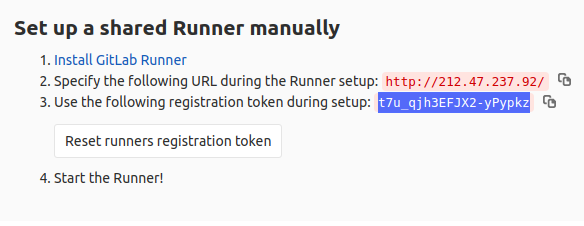
Each gitlab runner needs a registration token to register on the gitlab server. Retrieve the registration token from the GitLab web interface (“admin area” > “runner”):
2 . Fill the value.yaml with :
- the gitlabUrl (in our case
http://212.47.237.92/) - the registration token
- enable
rbac
[..]
gitlabUrl: http://212.47.237.92/
runnerRegistrationToken: "t7u_qjh3EFJX2-yPypkz"
rbac:
  create: true
  [..]
  serviceAccountName: default
We will use a dedicated namespace to install the gitlab runner, create it on your Kapsule cluster:
$ kubectl create ns gitlab-runner
namespace/gitlab-runner created
The default service account should use a new kubernetes role, and rolebinding.
Use the following example to create a role and role binding and associate it to the default service account in the gitlab-runner namespace :
$ cat <<EOF | kubectl create -f -
apiVersion: rbac.authorization.k8s.io/v1
kind: Role
metadata:
  name: gitlab-runner
  namespace: gitlab-runner
rules:
  - apiGroups: [""]
    resources: ["pods"]
    verbs: ["list", "get", "watch", "create", "delete"]
  - apiGroups: [""]
    resources: ["pods/exec"]
    verbs: ["create"]
  - apiGroups: [""]
    resources: ["pods/log"]
    verbs: ["get"]
EOF
$ kubectl create rolebinding --namespace=gitlab-runner gitlab-runner-binding --role=gitlab-runner --serviceaccount=gitlab-runner:default
Use the helm command to install the runner (note that you specify in this command line the values.yaml file) :
$ helm install --namespace gitlab-runner  gitlab-runner -f ./values.yaml gitlab/gitlab-runner
NAME: gitlab-runner
LAST DEPLOYED: Wed May  6 15:48:20 2020
NAMESPACE: gitlab-runner
STATUS: deployed
REVISION: 1
TEST SUITE: None
NOTES:
Your GitLab Runner should now be registered against the GitLab instance reachable at: "http://212.47.237.92/"
You can check the runner is working ok in the gitlab console (“admin area” > runners):

Running a pipepline in the runner using a test app
To demonstrate if the runner is working, we create a gitlab repository with a “hello world” piece of code written in python.
An associated gitlab-ci file is added to check it is running ok in the runner we just deployed.
# cat helloworld.py
print("Hello, World!")
# cat .gitlab-ci.yaml
image: ubuntu
hello-test:
    script:
        - apt-get update && apt-get install python3
        - python3 helloworld.py

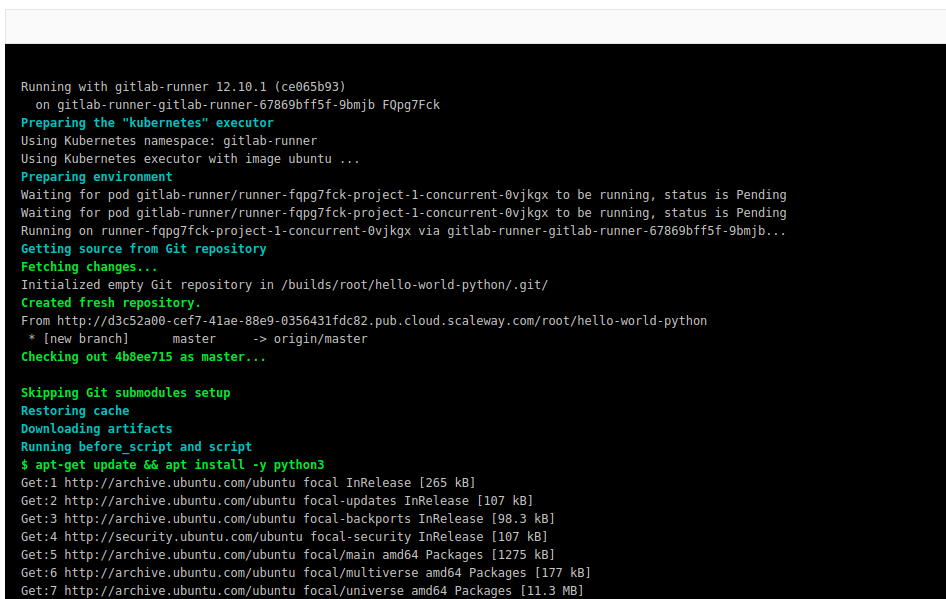
As you can see on the screenshot above the runner is executing the ci job.
If you want to learn more about running a gitlab runner on kubernetes you can also check the gitlab-ci official documentation